Scene Creator MEGA BUNDLE: The Ultimate Mockup Solution
Creating professional-looking mockups and branded content shouldn't require a design degree or hours of tedious work. That's exactly why the Scene Creator MEGA BUNDLE was developed—by creatives who understand the daily challenges of producing consistent, high-quality visuals for multiple platforms. This comprehensive collection of movable PNG transparent objects gives you everything needed to build custom scenes from scratch, whether you're designing social media posts, website headers, or product presentations.
What Makes This Scene Creator Different
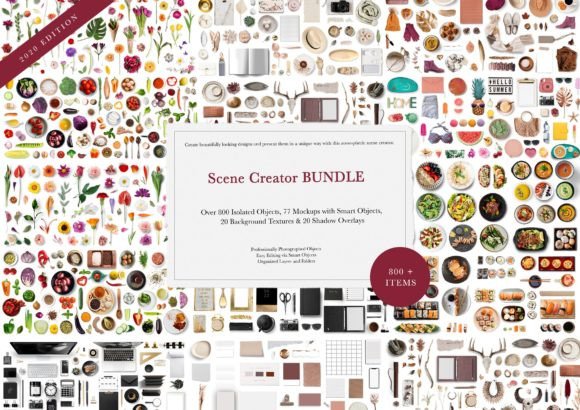
Unlike static mockup templates that lock you into predetermined layouts, the Scene Creator MEGA BUNDLE provides genuine creative control. With 800 isolated PNG objects at your disposal, you're essentially getting a digital prop studio that fits on your hard drive. Each element has been carefully extracted from its background down to the finest detail, ensuring clean edges and seamless integration into your projects. The pack includes not just objects, but 77 pre-built mockup scenes, 20 versatile backgrounds, and 20 shadow overlays that add realistic depth to your compositions.
The practical advantage here is significant. Instead of purchasing separate mockup packs for different themes or occasions, this single bundle covers an enormous range of scenarios. Need a flat lay for a skincare brand? Done. Creating a cozy reading nook scene for a bookstagram post? Absolutely. Building a professional workspace setup for a business blog? It's all included. The variety of objects spans from electronics and stationery to food items, beauty products, and decorative elements—each rendered in a cohesive style that works together harmoniously.
Practical Applications Across Creative Projects
The real strength of the Scene Creator MEGA BUNDLE emerges when you consider its versatility across different professional contexts. For brand identity work, having access to customizable mockups means you can present logo designs, packaging concepts, and brand collateral in realistic settings without scheduling expensive photoshoots. Marketing teams appreciate the speed factor—what once took hours of setup, photography, and editing now takes minutes of drag-and-drop arrangement.
Bloggers and content creators find particular value in the consistency this tool provides. Your Instagram feed maintains visual coherence when every flat lay shares the same photographic quality and styling approach. The social media graphics you produce look intentionally curated rather than cobbled together from mismatched stock photos. Publishers can create compelling book mockups, while e-commerce sellers showcase products in lifestyle contexts that help customers envision ownership.
Small business owners often struggle with the gap between their professional aspirations and their available resources. This bundle bridges that gap effectively. A handmade candle business can create elegant product scenes without hiring a photographer. A freelance consultant can build polished presentation materials that convey competence and attention to detail. The design assets included support both digital and print applications, from website banners to printed marketing materials.
Working With Smart Objects and Layers
The included Photoshop PSD file unlocks the full potential of the Scene Creator MEGA BUNDLE. Each of the 77 mockups utilizes smart object layers, which means you can insert your own designs into frames, screens, and surfaces with just a double-click. This feature alone saves tremendous time when creating client presentations or product catalogs. The organizational structure deserves mention too—every element sits in its own layer within clearly labeled folders, making navigation intuitive even in complex compositions.
For those newer to modern typography and design software, the learning curve remains manageable. The drag-and-drop functionality works in most photo editing applications that support layers, though Photoshop provides the most complete experience. You can move items freely, rotate them to achieve natural angles, and scale elements without significant quality loss thanks to the high-resolution source files. This flexibility means your scenes never look templated or repetitive, even when using the same objects across multiple projects.
Choosing the Right Elements for Your Project
Effective scene creation requires thoughtful selection rather than cramming every available object into a single composition. Start by identifying the mood and message your project needs to convey. A minimalist web design header might use only three or four carefully placed items against a clean background, while an abundant flat lay for a holiday promotion could incorporate dozens of elements to create visual richness.
Consider your font pairing choices alongside your scene elements. The objects in this bundle maintain a contemporary, clean aesthetic that complements both serif and sans serif font combinations. When overlaying text on your created scenes, ensure sufficient contrast and breathing room. The shadow overlays prove particularly useful here—they add dimension that helps foreground text stand apart from background elements.
Color coordination matters significantly when building scenes from individual components. While the objects maintain consistent lighting and perspective, paying attention to color temperature and saturation levels across your chosen elements creates more believable compositions. The 20 included backgrounds range from neutral surfaces to subtly textured options, providing a foundation that either recedes quietly or contributes to the overall color story.
Building Consistent Visual Content
The most valuable aspect of owning the Scene Creator MEGA BUNDLE isn't any single mockup—it's the ability to maintain visual consistency across an entire content calendar. When your packaging design presentations match your social media aesthetic which matches your email newsletter graphics, audiences begin recognizing your brand before reading a single word. This recognition compounds over time, building the kind of professional credibility that converts casual browsers into committed customers.
Commercial licensing considerations remain straightforward with this bundle. The assets support both personal and commercial projects, giving freelancers and agencies confidence when creating deliverables for clients. This flexibility extends the value proposition considerably—you're not just buying tools for your own brand, but investing in design assets that serve your entire client roster.
For anyone producing regular visual content—whether that's editorial design for digital publications, product photography alternatives for e-commerce, or branded templates for corporate communications—the Scene Creator MEGA BUNDLE represents a practical investment in efficiency and quality. The time saved on production alone quickly justifies the purchase, while the professional polish it brings to your output strengthens every client interaction and audience touchpoint.